Loading game
Preparing player
Loading game
Ready to play
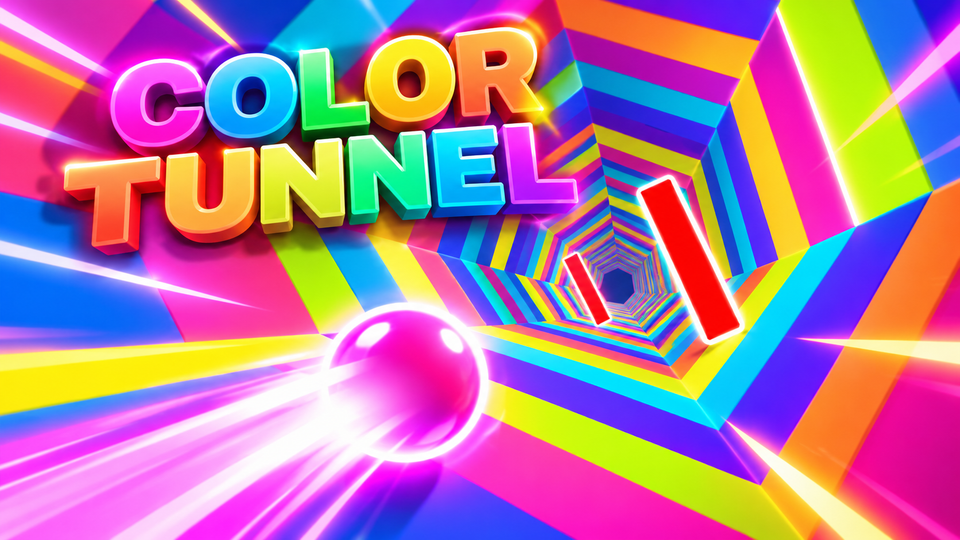
Color Tunnel is a fast 3D reflex game where you steer left and right, dodge moving obstacles, survive increasing speed, and push for a longer run.
Color Tunnel is a 3D reflex game where you move continuously through a brightly colored tunnel and steer left or right to avoid geometric obstacles. The objective is to survive for as long as possible without colliding with a barrier. As the run continues, obstacles become more demanding and the increasing pace leaves less time to correct a bad movement.
The classic browser version hosted on Y8 credits Gamebiz as the developer and was added there on January 31, 2018. It uses Unity WebGL and is designed around a small control set rather than jumps, attacks, or complicated abilities.
Your movement through the tunnel happens automatically. Instead of controlling forward speed, you concentrate on your position around the tunnel and move away from incoming barriers.
The obstacles appear in different geometric arrangements. Some leave wide openings that require only a small correction, while others create narrow gaps or moving patterns that demand earlier positioning. The tunnel layout also changes as you continue, so surviving depends more on reading the next obstacle than memorizing one fixed sequence.
One collision ends the current run. Because there is no health bar to absorb repeated mistakes in the classic version, accurate steering becomes increasingly important once obstacles begin arriving more quickly.
The classic desktop version supports both the Arrow Keys and A/D for horizontal movement.
There is no jump button in the standard control scheme. Success comes from choosing the correct side of the tunnel before each obstacle reaches you.
Some barriers remain fixed, making the open route relatively easy to identify. Others move or rotate, so the gap you initially see may no longer be in the same place by the time you arrive.
Moving obstacles should be treated differently from static ones. Instead of steering toward the current opening immediately, watch its movement for a moment and estimate where the gap will be when your forward motion reaches it.
This becomes more difficult at higher speed because there is less time to observe the pattern. Small early corrections are generally safer than a large last-second movement.
Watching only your current position makes Color Tunnel much harder. By the time an obstacle reaches the front of the screen, your remaining reaction window may already be too small.
Focus farther down the tunnel so you can recognize the next opening early. This lets you begin moving before the barrier becomes urgent and gives you time to stop once you are aligned.
Looking ahead also helps when two obstacles appear close together. The safest route through the first barrier is not always the one that leaves you in a good position for the second.
The longer you survive, the faster and more demanding the run becomes. Y8 describes the game as increasing in speed while obstacle patterns become more frequent and complex.
At lower speed, holding a direction for a moment may be manageable because you have time to correct afterward. At higher speed, the same input can move you too far past an opening.
Use shorter taps as the pace rises. Small adjustments provide better control and reduce the chance of crossing the entire safe gap before you can react.
Some versions of the classic game alternate between traveling through the inside of a tunnel and moving along exposed outer sections or bridge-like tracks. The obstacle patterns remain based on finding safe openings, but the change in perspective can make positioning feel different.
When the environment changes, avoid making an immediate large correction. Give yourself a moment to understand how the new section is oriented, then continue using short left-and-right inputs.
Small inputs make it easier to stop in the middle of a narrow opening. Long holds create unnecessary sideways movement and can turn a correct dodge into a collision.
Your goal is not simply to move away from an obstacle. Identify the empty route you want to pass through and steer toward that space.
When several barriers appear close together, choose a route through the first one that leaves you near the opening needed for the next.
Waiting until an obstacle fills the screen becomes increasingly risky as the pace rises. Move as soon as you can clearly identify a safe route.
If the upcoming section is open, remain in a flexible position. Moving far to one side unnecessarily gives you more distance to cover if the next gap appears elsewhere.
If you enjoy fast obstacle courses, tunnels, and reaction-based movement, try these related games on YaloGames.
The objective is to travel as far as possible through the tunnel without colliding with geometric obstacles.
Use the Left and Right Arrow keys or A and D to move around the tunnel and avoid barriers.
Yes. The pace increases during longer runs, while obstacle layouts become more demanding and leave less time to react.
The classic Y8 browser version credits Gamebiz as the developer and lists January 31, 2018 as the date it was added to Y8.
In the classic version, a collision ends the current attempt, after which you can restart and try to improve your distance.
Color Tunnel uses only left-and-right movement, but higher speeds and changing obstacle patterns make precise positioning increasingly difficult. Look farther down the tunnel, steer toward openings rather than away from barriers, use short corrections, and plan for the obstacle after the one directly ahead. The farther you travel, the less room there is for a late movement or unnecessary correction.
LIVE CHAT
No messages yet. Start the conversation.
Log in to join the chat.
Login